


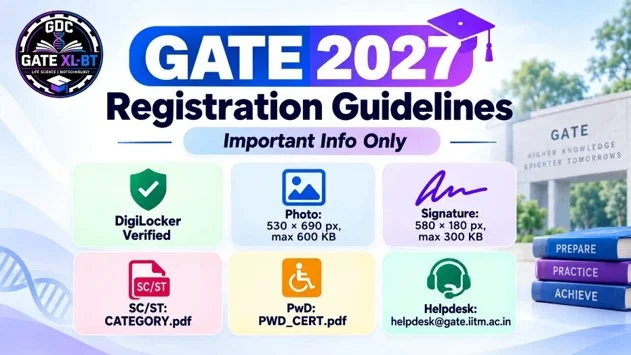

Candidates applying for GATE 2027 should check the latest registration instructions before completing the application form. IIT Madras has published important guidance related to DigiLocker verification, photo and signature requirements, common registration errors, PwD assistance, and category documents.
Quick Summary
GATE 2027 applicants should use a verified DigiLocker account, check photo and signature specifications, and resolve DigiLocker or email-related errors before submitting the form. SC/ST/PwD candidates need specific documents in the DigiLocker GATE2027 folder. Visually impaired candidates facing live facial capture issues can contact the official helpdesk.

Important GATE 2027 Registration Guidelines
| Requirement | Important Detail |
| DigiLocker | Use a verified DigiLocker account |
| Photo | Maximum 530 × 690 pixels, up to 600 KB |
| Signature | Maximum 580 × 180 pixels, up to 300 KB |
| Facial Capture | Use a phone with at least 5 MP camera in good lighting |
| SC/ST Document | Upload as CATEGORY.pdf |
| PwD Document | Upload as PWD_CERT.pdf |
| UDID Certificate | Upload as UDID_CERT.pdf |
These instructions are listed on the official GATE 2027 registration guidance page.
DigiLocker Instructions for GATE 2027
Candidates must continue registration using a verified DigiLocker account. IIT Madras states that simply creating a DigiLocker account is not enough; the profile should be verified through Aadhaar-based e-KYC.
If there is a mismatch between DigiLocker and the GATE portal, candidates are advised to complete DigiLocker e-KYC and try again.
SC/ST/PwD Candidates: DigiLocker Folder
SC/ST and PwD candidates should create a GATE2027 folder in DigiLocker.
- SC/ST certificate: CATEGORY.pdf
- PwD certificate: PWD_CERT.pdf
- UDID certificate: UDID_CERT.pdf
For some PwD cases, Appendix B1, Appendix B2, and the PwD certificate may need to be combined into a single PDF.
Common GATE 2027 Registration Problems
The official guidance includes help for common issues such as:
- DigiLocker consent page error
- Already registered email ID error
- DigiLocker error through the GOAPS portal
- Verification failed / email already exists error
Important Update for Candidates with Disabilities
Candidates with disabilities, especially those with visual impairments, who face problems with live facial capture should contact:
Email: helpdesk@gate.iitm.ac.in
The helpdesk can assist in completing the application process.
Photo and Signature Requirements
Photograph
- Maximum size: 530 × 690 pixels
- Maximum file size: 600 KB
Signature
- Maximum size: 580 × 180 pixels
- Maximum file size: 300 KB
Before You Start Registration
Candidates should keep these points ready:
- Verified DigiLocker account
- Correct photograph and signature
- Required category/PwD documents, if applicable
- Stable internet connection
- Mobile phone with at least 5 MP camera for facial capture
- Application fee details checked beforehand

Important Official Links
Official GATE 2027 Registration Guidelines:
GATE 2027 Registration Guidelines
Official GATE 2027 Website:
GATE 2027 Official Website
FAQs
Is DigiLocker compulsory for GATE 2027 registration?
The official instructions state that candidates must continue registration using a verified DigiLocker account.
What is the maximum photo size?
The photograph can be up to 530 × 690 pixels and 600 KB.
What is the maximum signature size?
The signature can be up to 580 × 180 pixels and 300 KB.
What should SC/ST candidates upload in DigiLocker?
A valid SC/ST certificate should be uploaded as CATEGORY.pdf in the GATE2027 folder.
What should PwD candidates upload?
PwD candidates should upload PWD_CERT.pdf, and UDID certificate as UDID_CERT.pdf, where applicable.
What if live facial capture is not working?
Candidates with visual impairments facing this issue should contact helpdesk@gate.iitm.ac.in.
What camera is recommended for facial capture?
The official site recommends a mobile phone with at least a 5 MP camera in a well-lit area.
Conclusion
Before submitting the GATE 2027 application, check DigiLocker verification, image specifications, category documents, and common registration issues. Following the official IIT Madras guidelines can help avoid unnecessary application errors.
Recommended Products