





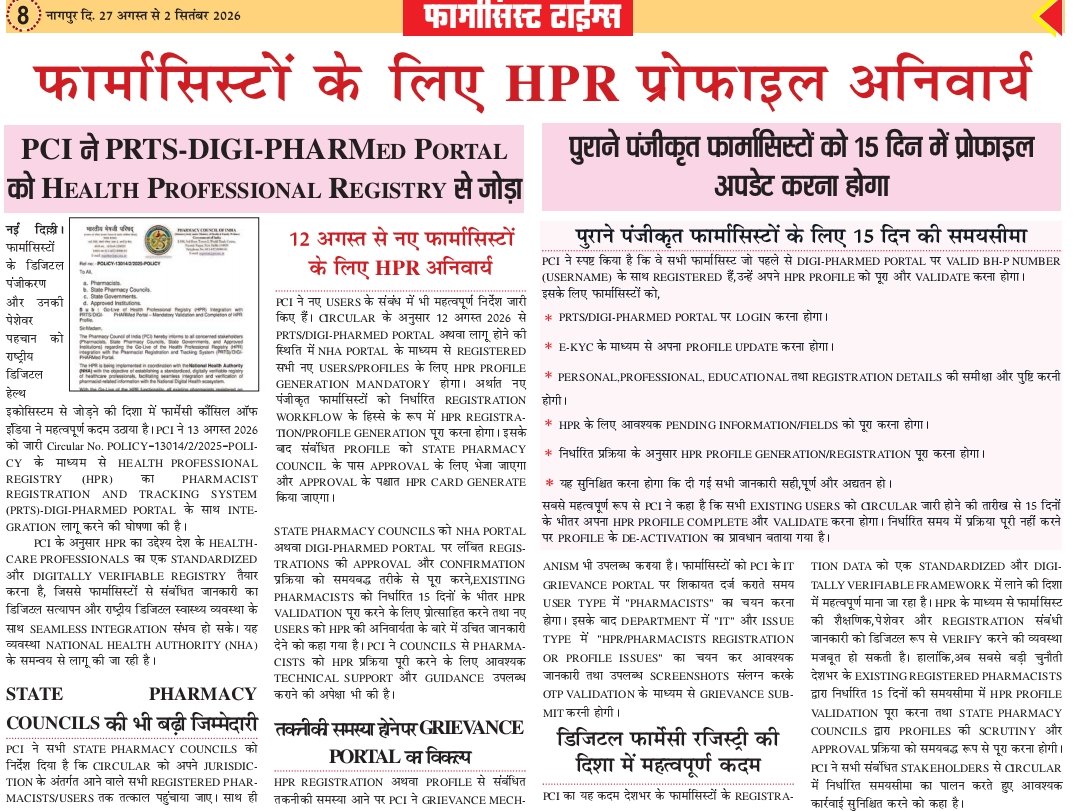
“HPR Profile Mandatory for Pharmacists” is an important update from the Pharmacy Council of India (PCI). The Council is integrating pharmacist registration information from the PRTS/DIGI-PHARMed Portal with the Health Professional Registry (HPR). Existing registered pharmacists should check their profile, complete the required verification process, and update their information as instructed by PCI.
Existing registered pharmacists should check their DIGI-PHARMed profile, complete the required verification and update process, and ensure that their information is accurate.
PCI had earlier issued guidelines for verifying pharmacists’ profiles with the Ayushman Bharat Health Account (ABHA) Number for integration with HPR.
Quick Summary
PCI’s HPR integration initiative connects pharmacist registration records on the PRTS/DIGI-PHARMed Portal with the Health Professional Registry. Existing registered pharmacists need to verify and update their profiles, complete required e-KYC and pending information, and follow the prescribed HPR profile generation and validation process.

What Is HPR Profile for Pharmacists?
The Health Professional Registry (HPR) is part of India’s digital health ecosystem and is intended to maintain information about healthcare professionals in a standardized and digitally verifiable manner.
For pharmacists, the integration process involves linking and verifying professional registration information maintained through PCI’s digital systems.
PCI’s digital ecosystem includes DIGI-PHARMed and PRTS, with PRTS being used for pharmacist registration and related services.
Why Is HPR Integration Important?
HPR integration can help create a more standardized digital record of registered pharmacists.
The major objectives include:
- Digital verification of pharmacist credentials
- Standardization of pharmacist registration data
- Better management of professional records
- Reduction of data discrepancies and duplication
- Integration with the wider digital healthcare ecosystem
- Easier verification of professional information
PCI has also issued a separate notification regarding data inaccuracy and duplication of registered pharmacists on the DIGI-PHARMed Portal, highlighting the importance of accurate pharmacist records.
PCI HPR Profile Update: What Pharmacists Need to Know
According to the latest information shown in the PCI communication, existing registered pharmacists are required to complete the prescribed HPR profile update and validation process within the specified timeline.
HPR Requirement for New Pharmacists
For newly registered pharmacists, HPR integration is being made part of the registration workflow.
Pharmacists should therefore ensure that their profile and registration information is correctly completed and verified during the applicable registration process.
HPR Requirement for Existing Registered Pharmacists
Existing registered pharmacists should:
- Log in to the DIGI-PHARMed/PRTS Portal.
- Check their pharmacist profile.
- Complete the required e-KYC process.
- Verify personal information.
- Verify professional and educational details.
- Check pharmacy registration information.
- Complete any pending mandatory fields.
- Complete the HPR profile generation/registration process.
- Validate the final profile and submitted information.
Important: The exact deadline and procedure should be checked against the latest official PCI communication because portal instructions and timelines may be updated.

HPR Profile Update Process for Pharmacists
The process can be understood in the following steps:
Step 1: Visit the DIGI-PHARMed Portal
Pharmacists should access the official PCI DIGI-PHARMed system and log in using their registered credentials.
PCI’s official documentation identifies the DIGI-PHARMed Portal and PRTS as part of its digital systems for pharmacy stakeholders.
Step 2: Login to Your Pharmacist Profile
Use the appropriate login credentials associated with the pharmacist profile.
After logging in, carefully review the information displayed in the profile.
Step 3: Complete e-KYC
Where required, complete the prescribed e-KYC/identity verification process.
Pharmacists should make sure that their identity details match the required records before completing the verification.
Step 4: Check Personal Details
Review details such as:
| Profile Information | What to Check |
|---|---|
| Name | Correct spelling |
| Date of Birth | Correct information |
| Mobile Number | Active registered number |
| Email ID | Correct email |
| Address | Updated information |
| Identity Details | Matching records |
Step 5: Verify Professional and Educational Details
Pharmacists should carefully check their qualification and professional information.
This may include relevant educational qualification and pharmacist registration information available in the portal.
Step 6: Verify Registration Details
Check the State Pharmacy Council registration information, including the registration number and other available registration details.
The validity and renewal rules for pharmacist registration can vary according to the relevant State Pharmacy Council. PCI’s FAQ also advises candidates to contact their respective State Pharmacy Council regarding registration validity.
Step 7: Complete Pending Information
If the portal shows any pending information or mandatory fields, complete them before submitting or validating the profile.
Do not submit incorrect or unverified information.
Step 8: Generate and Validate the HPR Profile
After completing the required information, follow the portal instructions for HPR profile generation/registration and final validation.
Pharmacists should save any available confirmation or reference details for future use.
Documents and Information to Keep Ready
Before starting the profile update, pharmacists should keep their relevant records available.
| Information/Document | Purpose |
|---|---|
| Pharmacist Registration Details | Verification of professional registration |
| Educational Qualification Details | Verification of pharmacy qualification |
| Aadhaar/Identity Details | e-KYC/identity verification, where applicable |
| Mobile Number | OTP/verification |
| Email ID | Communication and account-related updates |
| ABHA Number | HPR integration, where applicable |
The PCI’s earlier HPR guideline specifically referred to verification of the pharmacist profile with the ABHA Number for integration with HPR.
What If Your Pharmacist Profile Has Wrong Information?
Pharmacists should not ignore incorrect information on their DIGI-PHARMed profile.
PCI has previously issued a notification specifically concerning data inaccuracy and duplication of registered pharmacists on the DIGI-PHARMed Portal.
If your profile contains an error:
- Check whether the portal provides an edit/update option.
- Update the information using the prescribed process.
- Keep supporting documents ready if required.
- If the issue cannot be resolved through the portal, use the appropriate PCI grievance mechanism.
PCI also provides a grievance redressal mechanism for issues related to its digital systems.
What Is the Role of State Pharmacy Councils?
State Pharmacy Councils play an important role because pharmacist registration information is maintained at the state level.
The HPR integration process requires accurate and standardized pharmacist information so that professional records can be appropriately verified.
State Pharmacy Councils therefore need to ensure that registered pharmacist information is accurate, complete and suitable for integration with the digital registry.
Is HPR Profile Mandatory for All Pharmacists?
The latest PCI communication indicates that HPR integration is being implemented for pharmacists through the PRTS/DIGI-PHARMed system.
However, pharmacists should distinguish between:
- New pharmacist registration
- Existing registered pharmacist profile update
- HPR profile generation
- Profile validation
- State Pharmacy Council registration/renewal
These are related but are not necessarily the same process.
Pharmacists should follow the latest instructions applicable to their individual profile.
Why Should Pharmacists Complete the HPR Profile?
Completing the HPR-related process can help pharmacists maintain an accurate digital professional record.
Key benefits include:
- Digital professional identity
- Better verification of credentials
- Standardized registration information
- Improved data accuracy
- Integration with India’s digital health ecosystem
- Easier management of professional information
PCI has described its digital transformation as an interconnected ecosystem involving platforms such as DIGI-PHARMed and PRTS.
HPR Profile for Pharmacists: Important Details
| Particular | Details |
|---|---|
| Authority | Pharmacy Council of India (PCI) |
| Digital Platform | DIGI-PHARMed / PRTS |
| Registry | Health Professional Registry (HPR) |
| Target Group | Registered Pharmacists |
| Main Purpose | Digital verification and integration of pharmacist information |
| Verification | Profile/e-KYC and required information |
| ABHA | Relevant to the HPR integration process |
| Deadline | As specified in the latest PCI communication |
| Official Source | Pharmacy Council of India |
How to Access the Official DIGI-PHARMed Portal?
Pharmacists should use the official PCI digital portal rather than relying on unofficial websites or third-party links.
Official PCI Website: Pharmacy Council of India
Official DIGI-PHARMed Portal: PCI’s official documentation identifies DIGI-PHARMed and PRTS as its pharmacist-related digital platforms.
Important Points for Pharmacists
Before completing the HPR profile process, keep these points in mind:
- Enter only correct information.
- Check your name and personal details carefully.
- Verify your pharmacist registration information.
- Check educational and professional details.
- Complete pending mandatory fields.
- Complete the required verification process.
- Keep confirmation/reference details safely.
- Do not share OTPs or login credentials with anyone.
- Use only official PCI/State Pharmacy Council sources.
- Check the latest PCI notification for any revised deadline or instructions.
FAQs: HPR Profile for Pharmacists
1. What is HPR for pharmacists?
HPR stands for Health Professional Registry. It is a digital registry designed to support standardized and digitally verifiable information about healthcare professionals. PCI is integrating pharmacist information with HPR through its digital systems.
2. Is HPR profile required for pharmacists?
PCI’s current communication indicates that HPR integration is being implemented for pharmacists. Existing registered pharmacists should complete the applicable profile update and validation process according to the latest PCI instructions.
3. Which portal is used for pharmacist HPR integration?
The process is associated with the PRTS/DIGI-PHARMed Portal, PCI’s digital system for pharmacist registration and related services.
4. What details should pharmacists verify?
Pharmacists should check their personal, educational, professional and registration details and complete any pending mandatory information required by the portal.
5. Is ABHA required for HPR integration?
PCI’s earlier HPR guideline specifically addressed verification of a pharmacist’s profile with an ABHA Number for integration with HPR. Pharmacists should follow the latest portal instructions applicable to their profile.
6. What should I do if my DIGI-PHARMed profile contains incorrect information?
First, check whether the portal provides an option to edit or update the profile. If the issue cannot be resolved through the available profile-update facility, use the appropriate PCI grievance mechanism. PCI has a dedicated grievance facility for issues related to its digital systems.
7. Can a pharmacist ignore the HPR profile update?
Pharmacists should not ignore the instructions applicable to their profile. They should complete the required process within the timeline mentioned in the latest PCI communication.
8. Where can pharmacists check official updates?
Pharmacists should check the official Pharmacy Council of India website, the DIGI-PHARMed Portal and their respective State Pharmacy Council for official instructions and updates.
Important Links
- PCI Official Website: Pharmacy Council of India
- PCI HPR Guidelines: PCI Guidelines for Pharmacist HPR Integration
- PCI DIGI-PHARMed Information: PCI DIGI-PHARMed Resources
- “latest pharmacist government jobs”
- “pharmacist exam preparation”
- “Drug Inspector preparation”
- “RRB Pharmacist preparation”
- “latest pharmacy job notifications”
- “pharmacy career guidance”
Avoid using the exact same anchor text repeatedly.
Conclusion
The HPR Profile for Pharmacists is an important part of PCI’s ongoing digital integration of pharmacist registration information. The PRTS/DIGI-PHARMed system is being connected with the Health Professional Registry to support standardized and digitally verifiable professional records.
Existing registered pharmacists should check their DIGI-PHARMed profile, verify their personal, educational, professional and registration details, complete the required e-KYC and pending information, and follow the prescribed HPR profile generation and validation process.
The exact deadline and any revised instructions should always be checked through the latest official PCI communication. Pharmacists should use only official PCI and State Pharmacy Council sources for completing the process.
Recommended Products